Granting access
Project Owners can grant access to other XNAT users. Give each person the least-permissive role that allows them to complete their work.
Add a user
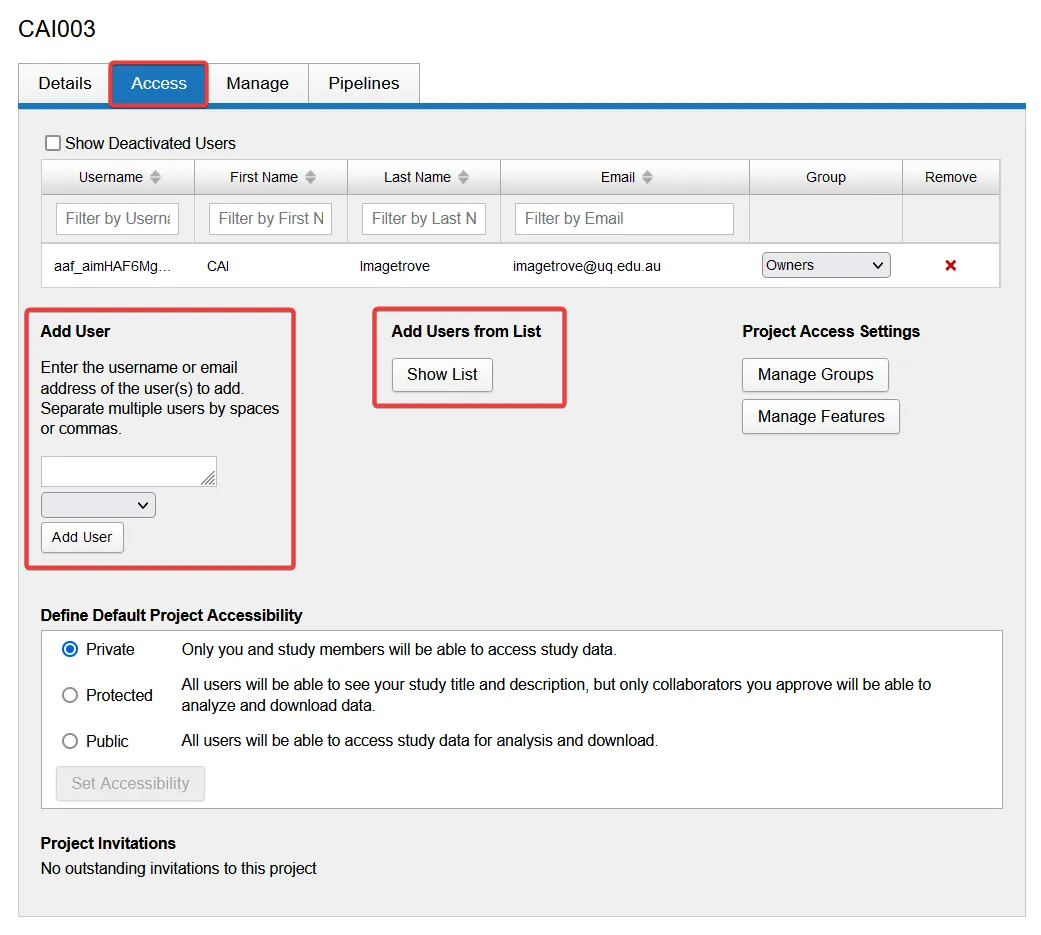
Section titled “Add a user”Open the project and select the Access tab. Select Add User to add one person or Add Users from List to add several people, then assign each person a role.
Choose a role
Section titled “Choose a role”- Owner can create, view, update and delete project data. Owners can also add or remove users and change their roles.
- Member can create, view and update project data, but cannot delete data or manage access.
- Collaborator can view and download project data, but cannot add or change data or manage access.
The permissions for each role are summarised below.
| Permission | Owners | Members | Collaborators |
|---|---|---|---|
| Data - Create | ✓ | ✓ | ✗ |
| Data - Read/Download | ✓ | ✓ | ✓ |
| Data - Update | ✓ | ✓ | ✗ |
| Data - Delete | ✓ | ✗ | ✗ |
| User - Add/Remove | ✓ | ✗ | ✗ |
| User - Change role | ✓ | ✗ | ✗ |
Next steps
Section titled “Next steps”Your projectRequest a project or get access to an existing one.
Request more storageIncrease the storage or file capacity of an XNAT-connected collection.